My firm has obtained a massive Project Management project covering the whole of Malaysia, and as such we need to increase our manpower count.
If you have -
a) 5 years Planning experience's
b) Quite versatile on Microsoft Project 2003 Professional usage (On the job training by the Szefu himself will also be given)
c) Looking for VERY GREEN PASTURES
send me your e-mail
drsyed88@yahoo.com
Tuesday, June 19, 2007


Monday, May 21, 2007
Progress Reports, the way it should be.
Progress reports has always been the requirement of all developments clients on their team of Contractors, Builders, Consultants and even their own supervisory team (The Clients’ Representatives). So much so, this requirement became so a familiarity or regularity that nobody actually pay much attention to it beyond the need to hear of the Percentage Achieved (Actual %) versus Percentage Targeted or Scheduled (Target %).
The situation is that, everyone seems to be very happy with the report format and when the project finally collapse due to unrecoverable delays, everybody jumped to all kinds of conclusion on why the whole mess-up happened in the first place. What caused the delay? When the delay did begin? No one could answer.
Exotic Project management software was brought in, more exotic Project Management companies was engaged to compile & tabulate reports and in a really bizarre case, a new company was formed by seconding executives from an already badly managed government agency whose projects too were seriously delayed. I actually observed one such organization whose job was Project Management creating Construction Programs using Microsoft ™ Excel, shading cells to show “time-lines”. Yes, that company was one of the key players. Yes, it was the era of comedies.
The mode of progress reporting went about in the following table look alike.
| WBS | TASK | Duration | Scheduled % | Actual % |
| KLXX1 | | 700d | 28% | 25% |
| KLXX1/1 | | 1680d | 75% | 65% |
| KLXX1/1/1 | | 450d | 53% | 28% |
Yup it did tell a few things, one the target value and the other the real value achieved on site. It also showed a WBS column (WBS stands for Work Breakdown Structure, which shows how the elements of works were arranged). In those days WBS was a HUGE word, yes many contractors were shaken to their deepest core when they hear the clients ask about WBS. And since it was a big word, its presence in the progress report was necessary, even when only the Project Planners are the only people who actually need and use the codes. Those Progress Reports were really awesome and sounded so professional. YES, it looks good but seriously lacking in many areas.
THE REAL REQUIREMENT
The pointers to a really good Progress Report
- Progress report’s real function is to tell as much as possible yet remaining simple enough.
- Shows tangible values so the reader knows and REALIZE the quantum
- Be specific, show only what is needed
- Categorize the report. If details are needed, attach as reference or appendix.
- Make the report All-Users Readable
- Show whose liability for displayed shortfalls
The above explained
- Progress report’s real function is to tell as much as possible yet remaining simple enough.
Show what is needed in Layered presentation. Say the 1st page shows the summary, see following format, then the next page show the further breakdown of the details and so on. Let the reader “see” as much as they want if the want to “see” them. Give the reader he choice of how deep into the detail they need to dig into. Need general info, read page 1, need more flip next page.
- Shows tangible values so the reader knows and REALIZE the quantum
Most progress reports shows the Scheduled Progress % and the Actual Progress %, some goes a bit more and include the DIFFERENCE % (this is the value obtained when Scheduled Progress % is deducted from the Actual Progress %)
| WBS | Task | Duration | Schedule % | Actual % | Difference |
| JK 1 | Bridge | 365d | 37% | 30% | 7% |
Ok, the above Progress Report looks ok but it still don’t tell you the fear factor involved. The human mind can read 7% but cannot quantify what is 7%?
To make an impact to values, we must use values that are simple to compare with something physical. Percentage is commonly used but in itself it is only a number. DURATION is better. The mind can picture say “1-day” against “1%”
Try this approach
| WBS | Task | Duration | Schedule % | Actual % | Difference % | Difference Days |
| ASYNC1 | ICT Project | 365d | 37% | 30% | 7% | -25,5days |
When you tell someone the progress is delayed 7%, the person can’t “picture” 7% and most probably not react with much emotions BUT
When you tell someone the Project is delayed 25.5 days, they are really going to panic big time!
Tip
REMEMBER- Show the numbers in TANGIBLE values.
- Be specific, show only what is needed
The title says it all, in most reports the clients needs to only see the important facts (the above chart is quite enough really). Most meetings want to be notified of the specified results, not thousands of lines of data.
Tip
When giving a “works that are delayed” report, try using a software that can filter ONLY THE DELAY values, this way the reader can go straight to the items concerned rather then trying to visually pick out the items that is delayed among the other hundreds that is not.
- Categorize the report. If details are needed, attach as reference or appendix.
Break your report into, Summary, Section Details and Full Details, filed in that order.
The main summary
Further breakdown
Full detail
- Make the report All-Users Readable
Some Project Management software can be so exotic that only the person churning it out really understands it, this person is generally the Planner or a software expert. A great program that no one can read or utilize is functionless. A good report is one that even the support people (supervisors & technicians) can read, understand and eventually USE.
Tip
- Don’t use PERT diagrams or network diagrams for display of your proposed work programs. Nobody except academicians understands these.
- Display your program in Bar Charts or GANTT charts, they are visually easier to understand.
- If your software allows it, display in Calendar format, so readers can just go to a specific date to see what needs done then.
- Show whose liability for displayed shortfalls
A report should be Resource Loaded or Responsibility attached. What this statement meant is to allocate the person or work force responsible to a particular Task. This will allow the client or meeting to lock on directly to the Work that is delayed and WHO should be coming up with the solution to recover from that delay.
Friday, March 16, 2007
Microsoft Enterprise Project Management

Comming soon
Is Microsoft Enterprise Project Management (EPM) really necessary for Malaysian users?
The answer is a big NO and a very small yes
What the Salesmen tells you
Big Organizations need EPM to control all their projects, to have a better control
What they DON'T tell you, is ...(The real FACTs they hide)
You need for your Project Management team to be very well trained in Microsoft Project BASIC or the Professional model FIRST before you can even fiddle around with EPM
Most of EPM "features" like multiple projects controls, can actually be done using the standard Microsoft Projects version
Most of these "salesmen/women" (forget what they say on their business cards ... they are just out for your money!) are NOT WELL VERSED in the MS Projects functions, some don't even use the software!
2 Major (Big Boys of GLC and Government status) feedback on EPM purchases express serious regrets. Their EPM purchases ends up as a white elephant!
MORE FACTS
You may use MS Project to
a) Manage more then one projects
b) You can share resources using the standard versions
c) The standard versions costs only 5% of the EPM version
d)Data storage & exchanges using MSP is easier the EPM
Ok now, for some good things about EPM
EPM gives the top management an access to preset reports from all their projects, this is necessary when the top management don't have the skills to operate MS Projects.
Since they are top management, they thus can have the power to buy expensive tools to serve their needs.
EPM too does Portfolio management
But really ... do Project Managers need portfolio management to THAT extent? Yes, you'll need to extract data from related features BUT you can do this with simple cheaper softwares like Microsoft's Access (TM) , which in turn can be linked to MS Project
Frankly, I wouldn't waste my money on EPM as I believe my Project Management needs will be easily satisfied using MS Project (or any other PM Softwares of that equivalent, e.g Primavera).
For added information, Primavera's equivalent of EPM, called ENTERPRISE, too is a BIG flop in Malaysia. Sold by its former ally,HSSI, Enterprise never made a hold in Malaysia because Primavera in itself is too specialize to be used by MOST Project Managers.
In general it is safe to say,
Just stick to the simple software solutions for now, until you can answer questions about Microsoft Project without having to switch on your PC, then and only then should you think about EPM
Microsoft Project 2007 (New is not necessary better)
 FLAWS & SHORTFALLS
First we dissect up Microsoft Project 2007
There are a couple of problems importing data into Microsoft Project 2007.
The first one is that importing an Excel 2007 file (in the new .xlsx format) does not work. The import appears to get hung up on some of the header information and from there you are stuck. The work-around for this is simple. Save from Excel into Excel 2000-2003 format and open that file in Project.
The second relates to importing .MPX files from other applications. At least a couple versions back, Microsoft started walking away from the .mpx format in favor of using xml as a standard exchange format. However, there are still other tools using it to exchange data and Project 2007 can open but not write .mpx files. If there are some records specifying correct calendars in the file then it will crash. For an explanation of what is happening and how to fix it, the best source is the ever helpful Adrian Jenkins who writes:
What I've found that if the file you're importing doesn't have a record type 20 and if at least one of the record type 20's calendar name doesn't match what's in record type 30, then the crash happens. Here's an example of what you may find in your MPX file:
MPX,Integration Tool Name,4.0
11,3,0,3,9,45
30,Project Name,,,,,,,1/17/2007
41,40,49,1,2,3,42
Importing an MPX file where record type 20 is missing and where the project's calendar name isn't identified in record 30 will cause the crash.
With record type 20 added, it'll look like this:
MPX,Integration Tool Name,4.0
11,3,0,3,9,45
20,Standard
30,Project Name,,,,,,,1/17/2007
41,40,49,1,2,3,42
In addition to record type 20, record type 30 also needs to specify the project's base calendar name and it should match the name in at least one of the type 20 records. Therefore, the MPX with the addtional information in record type 30 will look like this:
MPX,Integration Tool Name,4.0
11,3,0,3,9,45
20,Standard
30,Project Name,,,Standard,,,,1/17/2007
41,40,49,1,2,3,42
If you add this information to your MPX file, it should stop the crash from happening. You *may* see an additional import error, but you can click No to prevent the error(s) from appearing and the file should open.
P.S. With such problems Analyse Timescale in Excel is going to be messy. That too if you can find the Analyse Timescale in Excel icon to begin with .... its missing from its original position
Keep to Microsoft Project 2003 or its Professional brother, with Microsoft it never pays to be the First to have it
Thursday, March 15, 2007
Starting a Project Management Program

Well in all, when you want to start a Program in Microsoft Project, the quickie way is to do the following
Create a title .... Yup NAME THAT PROJECT OF YOURS
Open MSP
On the highest line (line 1), type in your Project Name
Then on line 2
Type in START, make the DURATION value a ZERO (thus changing the TASK to a MILESTONE)
Go to line 3
Type in your FIRST Activity .... put in the duration
REPEAT to all the ACTIVITIES you wish to put in ... of course on the next line and repeat
On your LAST activity type in FINISH, put in ZERO for the duration
NEXT
LINK the activities
Start with START, bring your mouse to the milestone icon (arrow will change to a 4-corner arrow), click and drag to the activity you want to RELATE that START to.
Repeat to ALL activities ... make sure somehow all will be linked to another or if can't be linked to anywhere else, link it to FINISH
THAT, is the Quickie way to your first Work Program!
Have fun ...
Thursday, January 11, 2007
PLANNERS DATABASE
PROJECT MANAGEMENT AND PLANNERS DATABASE
I am trying to compile the names and contact numbers of all Planners & schedulers to be input into a database of Planners in the country.
This I target will be for the setting up of a PLANNERS GUILD for the support and well being of people who share the same interest.
The list can also be used to generate a employees/employers search list for your own future greener pastures.
If you like the idea, Please submit your CV to me at drsyed@yahoo.com
I am trying to compile the names and contact numbers of all Planners & schedulers to be input into a database of Planners in the country.
This I target will be for the setting up of a PLANNERS GUILD for the support and well being of people who share the same interest.
The list can also be used to generate a employees/employers search list for your own future greener pastures.
If you like the idea, Please submit your CV to me at drsyed@yahoo.com
Monday, November 20, 2006
Microsoft Project 2007 (Part 1 Review)

Here's a quickie of what is in this new parcel
MULTIPLE LEVEL UNDO
Previously undo is only available ONCE.
Pro- Helps those newbies to backtrack their errors done 4 hours ago!
Con- Data integrity is questioned as changes can be "forced" on
What if situations
This new gimmic allows you to get a feel of what will happened to the project when a change comes into play, yet keeping the original program intact.
FINALLY A SOLUTION MARKING THE DEATH OF SAVING AS BASELINE
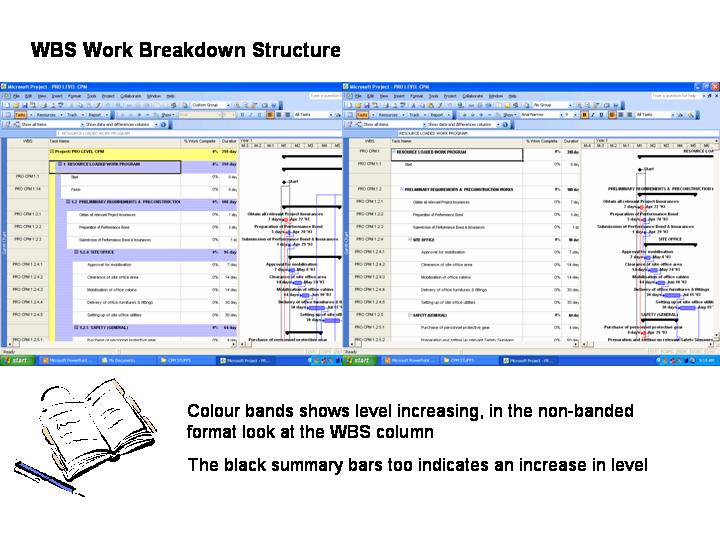
Colour Bands
The whole program can now be colour banded to show areas under different constraints, previously this can be done using GROUP BY
Multiple Types of Charts
The title says it all
Tuesday, November 07, 2006
PROJECT MANGEMENT SEMINARS
Enclosed is the latest list of Organizations conducting Project Management Training & Seminars
Contact
Bob Nizam (my partner in crime)
0122385356
For Special rates & customized training modules
Contact
Bob Nizam (my partner in crime)
0122385356
For Special rates & customized training modules
Friday, November 03, 2006
BASELINE USE from Yazeer of Borneo

Yeargh!!!! May I add, Doc to spice da blog wee bit?
No ONE RIGHT answer for this
My short 2 pesos view:
Users of program, its your choice of how to manage your project :)
i.e how you plan, track progress, manage changes, note stuffs, how to impress the client & the aweks/jantans etc
Use what's working and what's you're comfortable with.
On the program use, baselining may be useful if:
1- Your tracking is update resource usages; or update Actual Start/Finish/Duration/Remaining Duration (instead of update %) = Doing those updates may affect the START/FINISH parameters. so your gantt chart will look nuts = Client (non-Doc Syed's stud-ent) confused, unhappy, your boss unhappy etc
2- For less-confusing graphical presentation purposes (you need to adjust the layout of your Gantt Chart to show only BASELINE BAR)
As long as you don't confuse your client, should be fine!
Confused w my typings? Just stick to what Doc preached!
>> Yazeer (bad Tok Guru student)
Hihihihi.... I use baseline!
Sunday, October 22, 2006
Thursday, October 19, 2006
To Baseline or not to Baseline
Well yes, most contractors in Malaysia (and lots of Government People too) save their program as Baseline.
Don't blame these people for this mistake, Since when they are not sure of something, they normally follow by DEFAULT.
BASELINE is use to give "reality" to your program. In other words, the program will "Expand" if there is a delay (Also See my Lecture on EOT entitlement on Delays to work elements)and "shrink" when there is an acceleration or faster completion of a certain work element.
Most people call for BASELINE PROGRAM to be submitted, why they do so, you have to ask them! Maybe because they think a very BIG word will make them look smart, poor guys/gals are only looking for trouble.
The fact is this, different nations have different contractual procedures, some contracts ALLOWS for the end date to change as per delays or accelerations.
Malaysian work contract DOES NOT ALLOW for the end point to change due to delays or accelaration UNTIL an approval for EOT is given by the Owners or their representatives
Simply said if you approve a baseline program you are telling your contractor of the people carring out the work, that they are entitled to EOT for ALL DELAYS including their own (for instance no workers, no skills, no hope)
There are some people who say they wish to save as Baseline so they can know when the project will eventually finish. Good idea,My question to these people is "How do you track your individual elements when their durations keep on changing?"
- My answer. See my Notes on EOT claims justification, Advanced Level handouts, April 2006, use 2 programs one with baseline and another without. To trace the differences between the two, use WBS analysis. This method is accurate but will need step by step guidance on how to do it. I'll try to simplify it in my future forums (or try to get a seat in my next seminar)
MICROSOFT in their HELP area for Microsoft Project 2000 and above states, a PROGRAM NEED NOT BE SAVED AS BASELINE. Previous version ask whether you want to save as baseline or without, Version 2003 DEFAULT NOT SAVING AS BASELINE
Cheers!
Don't blame these people for this mistake, Since when they are not sure of something, they normally follow by DEFAULT.
BASELINE is use to give "reality" to your program. In other words, the program will "Expand" if there is a delay (Also See my Lecture on EOT entitlement on Delays to work elements)and "shrink" when there is an acceleration or faster completion of a certain work element.
Most people call for BASELINE PROGRAM to be submitted, why they do so, you have to ask them! Maybe because they think a very BIG word will make them look smart, poor guys/gals are only looking for trouble.
The fact is this, different nations have different contractual procedures, some contracts ALLOWS for the end date to change as per delays or accelerations.
Malaysian work contract DOES NOT ALLOW for the end point to change due to delays or accelaration UNTIL an approval for EOT is given by the Owners or their representatives
Simply said if you approve a baseline program you are telling your contractor of the people carring out the work, that they are entitled to EOT for ALL DELAYS including their own (for instance no workers, no skills, no hope)
There are some people who say they wish to save as Baseline so they can know when the project will eventually finish. Good idea,My question to these people is "How do you track your individual elements when their durations keep on changing?"
- My answer. See my Notes on EOT claims justification, Advanced Level handouts, April 2006, use 2 programs one with baseline and another without. To trace the differences between the two, use WBS analysis. This method is accurate but will need step by step guidance on how to do it. I'll try to simplify it in my future forums (or try to get a seat in my next seminar)
MICROSOFT in their HELP area for Microsoft Project 2000 and above states, a PROGRAM NEED NOT BE SAVED AS BASELINE. Previous version ask whether you want to save as baseline or without, Version 2003 DEFAULT NOT SAVING AS BASELINE
Cheers!
Wednesday, October 18, 2006
LATEST DISCUSSION (Project Tracking)
The following columns in Microsoft Project are used for-
% Complete
Tracks project progress based on physical duration or days
% Work Complete
Tracks the project progreaa based on manhours used or total manhours, please note here manhours is by WORK and totalls both man and machineries
USAGE OF FIXED COST COLUMN
Fixed cost is for entries of Lump Sum type of cost.
In general FIXED COST can be equaled to Manpower Cost + Mech Cost + Materials Cost + Profit or overheads, this value then transfer to Lump Sum into the COST column
A good way to track the items derived for Fixed Cost is to use NOTEs for the breakdown.
For MATERIALS BREAKDOWN
Try this.Go to the Resource heet
Type in the Resource Material name
Then change the TYPE to MATERIALS
Change the Material Lable to a unit of measurement you are using
Cick GANTT Chart
Select the Task which is using that material, double click
Select RESOURCE tab
Enter the Materials as a resource, enter quantity, OK
MORE DISCUSSION AVAILABLE IN THE
PROJECT MANAGEMENT Q and A Blog at the bottom
The following columns in Microsoft Project are used for-
% Complete
Tracks project progress based on physical duration or days
% Work Complete
Tracks the project progreaa based on manhours used or total manhours, please note here manhours is by WORK and totalls both man and machineries
USAGE OF FIXED COST COLUMN
Fixed cost is for entries of Lump Sum type of cost.
In general FIXED COST can be equaled to Manpower Cost + Mech Cost + Materials Cost + Profit or overheads, this value then transfer to Lump Sum into the COST column
A good way to track the items derived for Fixed Cost is to use NOTEs for the breakdown.
For MATERIALS BREAKDOWN
Try this.Go to the Resource heet
Type in the Resource Material name
Then change the TYPE to MATERIALS
Change the Material Lable to a unit of measurement you are using
Cick GANTT Chart
Select the Task which is using that material, double click
Select RESOURCE tab
Enter the Materials as a resource, enter quantity, OK
MORE DISCUSSION AVAILABLE IN THE
PROJECT MANAGEMENT Q and A Blog at the bottom
Sunday, October 15, 2006
Project Management Terminologies
Predecessor – An “activity” before
Successor – An “activity” after
WBS or Work Breakdown Structure – How a project is broken down into smaller sections. E.G. Highest level is the “Project” followed by “A Section/Area within the Project”, then the next level is “The Work within that Section”
Level – WBS in terms of numerical arrangement or arrays. E.G. Level 1 is in the WBS @ Project, Level 2 (or coded as L1.1) is Level 2 @ Section, Level 3 (or coded as L1.1.1) etc
Link – The Relationship between two or more activities or task
CPM or Critical Path Method – The longest linked line of activities/task from Start to Finish (Milestone to milestone)
Thursday, October 12, 2006
Project Management Q&A
 OK finally a free place for Free advice on Project Management, Microsoft Project & Project Planning.
Its simple really, just click COMMENT and type in your questions and I will get back to you with the answer as soonest possible. It would be nice if you can register as a member as membership has its advantages (like free samples)
Or if you are of the shy type, then send me an e-mail at drsyed88@yahoo.com, and I will publish the answer here (and e-mail you a copy too).

Subscribe to:
Posts (Atom)